How to Track Notion Page Views, Scroll Depth, and Engagement in 2026
How to Track Notion Page Views, Scroll Depth, and Engagement in 2026
You shared a Notion page.
Now what?
Did the person actually open it?
Did they read the whole page?
Did they stop halfway through?
Did they spend time on pricing?
Did they click your demo?
Did they come back later?
Notion already provides useful page analytics for understanding whether a page is being viewed.
But if you are sending a Notion page to a prospect, investor, client, or partner, a view count is usually only the beginning.
You may want to understand what happened after the page was opened.
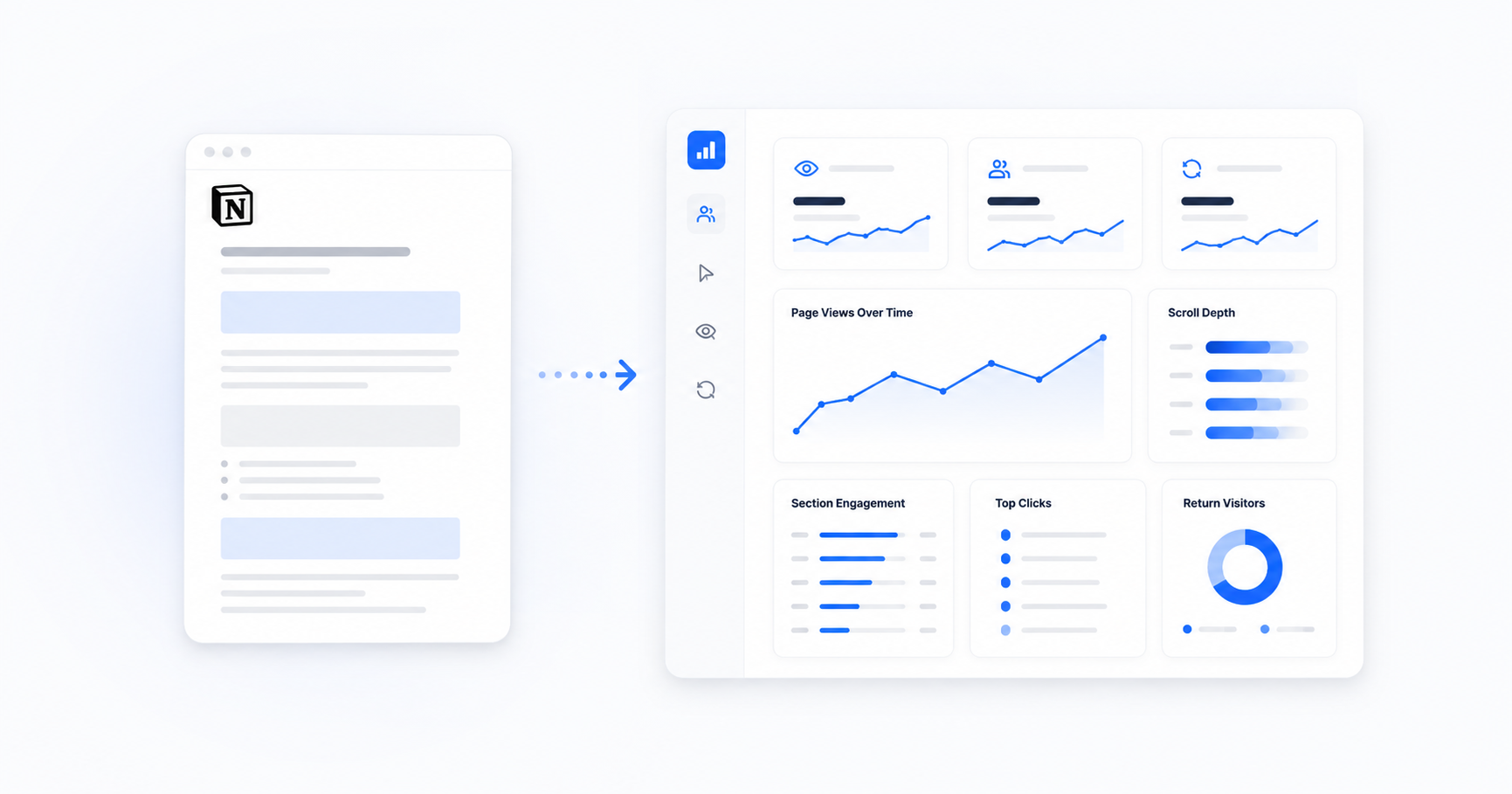
That means looking at signals such as scroll depth, section engagement, link clicks, viewer identity, and return visits.
This guide breaks down what Notion tracks natively, where those metrics are useful, and how to add a deeper engagement layer when a Notion page becomes part of a sales, fundraising, or client workflow.
What Is Notion Analytics?
Notion has its own page analytics system.
According to Notion's official Page Analytics documentation, page owners and editors can use the analytics tab to understand page activity.
Notion can show metrics such as:
- Total page views
- Unique page views
- Identifiable viewers and when they last viewed the page
If a page is shared to the web, Notion says those online views can also count toward the page's view totals.
There is one important distinction around page history.
Notion currently states that information about the creator and editors of a page is available on Business and Enterprise plans.
That is different from saying all page-view analytics requires those plans.
Notion explains the distinction in its guide to page and workspace analytics.
For internal pages, these native metrics can already answer an important question:
Are people actually viewing this content?
What Can Notion Page Analytics Tell You?
Imagine your team maintains an important process document in Notion.
You may want to know whether:
- Team members have seen the latest version
- A shared page is receiving views
- The same page continues getting attention
- Known collaborators have reviewed it
For an internal wiki, project document, company handbook, or knowledge base, that can be enough.
The problem changes when the page leaves the workspace.
Suppose the page is now:
- A sales proposal
- An investor overview
- A client report
- A product walkthrough
- A consulting deliverable
Now you are not only asking:
"Did this page get viewed?"
You are asking:
"How did this specific recipient engage with what I sent?"
That is a different analytics problem.
Why a Page View Does Not Tell the Whole Story
Imagine two prospects open the same Notion proposal.
Prospect A
They open the page.
They read the first section for a few seconds.
They leave.
Prospect B
They open the page.
They scroll through the full proposal.
They spend time around pricing.
They click your case study.
Then they return the next day.
Both people generated a page view.
But those two sessions do not represent the same behavior.
That is why useful document analytics looks beyond the open itself.
The Notion Engagement Metrics Worth Tracking
If you are using a Notion page as an external business document, these are some of the most useful signals:
| Metric | What It Tells You | Why It Matters |
|---|---|---|
| Page open | Whether someone accessed the tracked page | Confirms the content was viewed |
| Viewer identity | Who identified themselves before access | Adds context to the session |
| Scroll depth | How far the reader moved through the page | Shows whether important sections were reached |
| Section engagement | Where attention was concentrated | Helps identify areas of interest |
| Link clicks | Which resources the reader chose to open | Shows active behavior |
| Return visits | Whether the reader came back | Can signal continued evaluation |
| Sessions | How often the page was reviewed | Separates one skim from repeated engagement |
Let's look at each one.
1. Page Opens
The first question is still the simplest.
Did they open it?
That matters because an unopened page and an unconvincing page are two different problems.
Suppose you send a Notion proposal to 20 prospects.
Only three open it.
The issue could be:
- Your subject line
- Your outreach
- Your lead targeting
- The timing
- Your call-to-action
- The way you introduced the document
Rewriting every section of the proposal may not solve an outreach problem.
Tracking the open helps you separate the two.
2. Viewer Identity
A view tells you that somebody accessed the page.
Identity tells you who identified themselves as part of the viewing process.
This distinction matters because Notion does not automatically identify every anonymous public visitor.
Notion's own analytics guide says anonymous online viewers who are not workspace members or guests do not appear in the viewer list.
That is especially relevant when you're sharing a Notion page with investors, prospects, or clients who are not part of your workspace.
In those situations, an external identity gate can provide a separate identification step.
For example:
Tracked link → email gate → page access
Instead of guessing who an anonymous browser belongs to, the reader identifies themselves before viewing.
3. Scroll Depth
Scroll depth shows how far someone moved through a page.
For example:
- 25%
- 50%
- 75%
- 100%
Imagine your proposal is structured like this:
- Introduction
- Problem
- Solution
- Case study
- Pricing
- Implementation
- Next steps
If most readers stop around the third section, that is useful information.
Maybe:
- The introduction is too long
- The page has too much text
- The value proposition is unclear
- Important proof appears too late
- The reader simply was not a fit
Scroll depth does not tell you exactly why somebody stopped.
But patterns across multiple readers can show where attention consistently breaks.
4. Section-Level Engagement
Total time on a page can be misleading.
Someone might leave a browser tab open while doing something else.
A more useful question is:
Where did the reader spend their active attention?
For example:
- Pricing
- Implementation
- Traction
- Technical details
- Case studies
- FAQ
- Product roadmap
- Next steps
If several prospects consistently spend more time around implementation, that may be a clue that implementation is an important part of the buying decision.
If investors repeatedly focus on traction, prepare to explain those numbers in more detail.
Do not treat one event as certainty.
Look for patterns.
5. Link Clicks
A click is an active decision.
Your Notion page might link to:
- A product demo
- Pricing
- A calendar
- A case study
- Technical documentation
- A testimonial
- A video
- Another document
Those clicks can provide useful context.
Someone clicking a case study may be looking for proof.
Someone opening technical documentation may be evaluating implementation.
Someone clicking your calendar may be ready for a conversation.
Again, these are signals.
Not guarantees.
6. Return Visits
A return visit can be more interesting than a first open.
Someone may open your page on Monday and return on Wednesday.
Why?
Maybe they are:
- Reviewing it before a meeting
- Comparing options
- Looking for a specific detail
- Sharing information internally
- Preparing questions
You cannot know the exact reason from analytics alone.
But a return visit tells you the page remained relevant enough to reopen.
That can help you prioritize follow-up.
How Tracklytics Adds Deeper Notion Engagement Analytics
Notion's native analytics and Tracklytics serve different purposes.
Tracklytics does not take Notion's native view counter and simply display it somewhere else.
Instead, Tracklytics creates its own tracked viewing experience around the Notion page you intentionally share.
A basic workflow looks like this:
Step 1: Connect Your Notion Page
Connect the page you want to share through Tracklytics.
Step 2: Create a Trackable Link
Tracklytics generates a sharing link.
Step 3: Choose Your Access Settings
Depending on the workflow, you can use an identity or access gate before the reader sees the page.
Step 4: Share the Link
Send it through:
- Your CRM
- Slack
- An investor introduction
- A client conversation
Step 5: Review Engagement
Tracklytics records engagement from the tracked experience.
That can include signals such as:
- Opens
- Viewer identity
- Scroll depth
- Section engagement
- Link clicks
- Return visits
Notion Analytics vs Tracklytics
The two systems answer different questions.
| Question | Notion Analytics | Tracklytics |
|---|---|---|
| Is this Notion page receiving views? | Yes | Tracks the Tracklytics experience |
| How many unique views has it received? | Yes | Tracks its own viewers/sessions |
| Which known members or guests viewed it? | Yes, subject to Notion's viewer model | Not the main purpose |
| Who is an anonymous external reader? | Not automatically identified | Can use an identity gate |
| How far did the reader scroll? | Not a standard native page metric | Yes |
| Which sections received attention? | Not a standard native page metric | Yes |
| Which links were clicked? | Not a standard native page metric | Yes |
| Did an identified recipient return? | Limited by Notion's viewer model | Yes within the tracked experience |
The goal is not to replace a useful Notion feature.
It is to add context when the page becomes part of an external business interaction.
Where Deeper Notion Tracking Is Most Useful
Sales Proposals
You can see whether the prospect moved past the introduction, reached pricing, explored a case study, or came back later.
Investor Pages
Founders can keep a living investor page in Notion while getting more context around how recipients engage with it.
If fundraising is your use case, read How to Share a Notion Page With Investors and Track Their Engagement.
Client Reports
A consultant can understand whether the client reached the recommendations before the next meeting.
Product Walkthroughs
Teams can see which product sections or supporting links receive attention.
Private Business Documents
Not every page should become a public Notion Site just because you want to share it externally.
If that is your situation, read How to Track a Private Notion Page Without Publishing It Publicly.
Use Engagement Signals Without Being Creepy
Analytics should help you communicate better.
Do not write:
"I saw you spent 3 minutes and 42 seconds on our pricing section."
Instead, use the information to make your follow-up useful.
For example:
"Happy to walk through pricing or implementation if any questions came up while reviewing the proposal."
Same signal.
Better experience.
The analytics should guide the conversation.
It should not become the conversation.
Final Recommendation
Notion's native analytics is useful.
For many internal pages, it may be all you need.
But once a Notion page becomes a proposal, investor resource, client report, or other external business document, deeper engagement can answer questions a basic view count cannot.
The most useful signals include:
- Opens
- Viewer identity
- Scroll depth
- Section engagement
- Link clicks
- Return visits
- Session activity
The goal is not to monitor every movement.
The goal is to stop sending important pages blindly.
About Tracklytics
Tracklytics helps teams understand what happens after important content is shared.
With Notion support, you can create a tracked experience around a Notion page and understand how external readers engage after receiving the link.
Tracklytics is designed for:
- Founders
- Sales teams
- Agencies
- Consultants
- Marketers
- Client-facing teams
Or compare current options on the Tracklytics pricing page.
FAQ
Does Notion Have Page Analytics?
Yes.
Notion provides page analytics including total views, unique views, and viewer information under the conditions described in its official documentation.
Are Notion Page Analytics Only Available on Business and Enterprise Plans?
Notion specifically marks creator and editor history as a Business and Enterprise feature. Its documentation separately describes total views, unique views, and viewer information as page analytics.
Can I See Who Viewed My Notion Page?
Known workspace members and guests can appear in Notion's viewer information. Anonymous public web viewers are not automatically listed by identity.
Can I Track Scroll Depth on a Notion Page?
Tracklytics can measure scroll behavior inside its tracked Notion viewing experience.
Can I Track Link Clicks?
Yes.
Tracklytics can record link interactions within the tracked experience.
Does Tracklytics Replace Notion Analytics?
No.
The two analytics systems are separate.
Can I Track a Private Notion Page?
Yes.
You can connect an authorized page to Tracklytics without requiring the source page to be published as a public Notion Site.
Stop guessing. Start knowing.
Track when prospects open your proposals, see which pages they read, and follow up at exactly the right moment.
Try Tracklytics free →